I have a folder called gastos ("expenses") full of WhatsApp screenshots and PDFs: Mercado Pago transfer slips, Personal Pay receipts, the occasional invoice. Every so often I need to know how much I paid whom and when, and I end up opening them one by one. extract-rag is the project I'm building to fix that: upload the file, a vision model reads it, and out comes a JSON with the document type, amounts, dates, tax IDs and bank account numbers, already validated and ready to query.
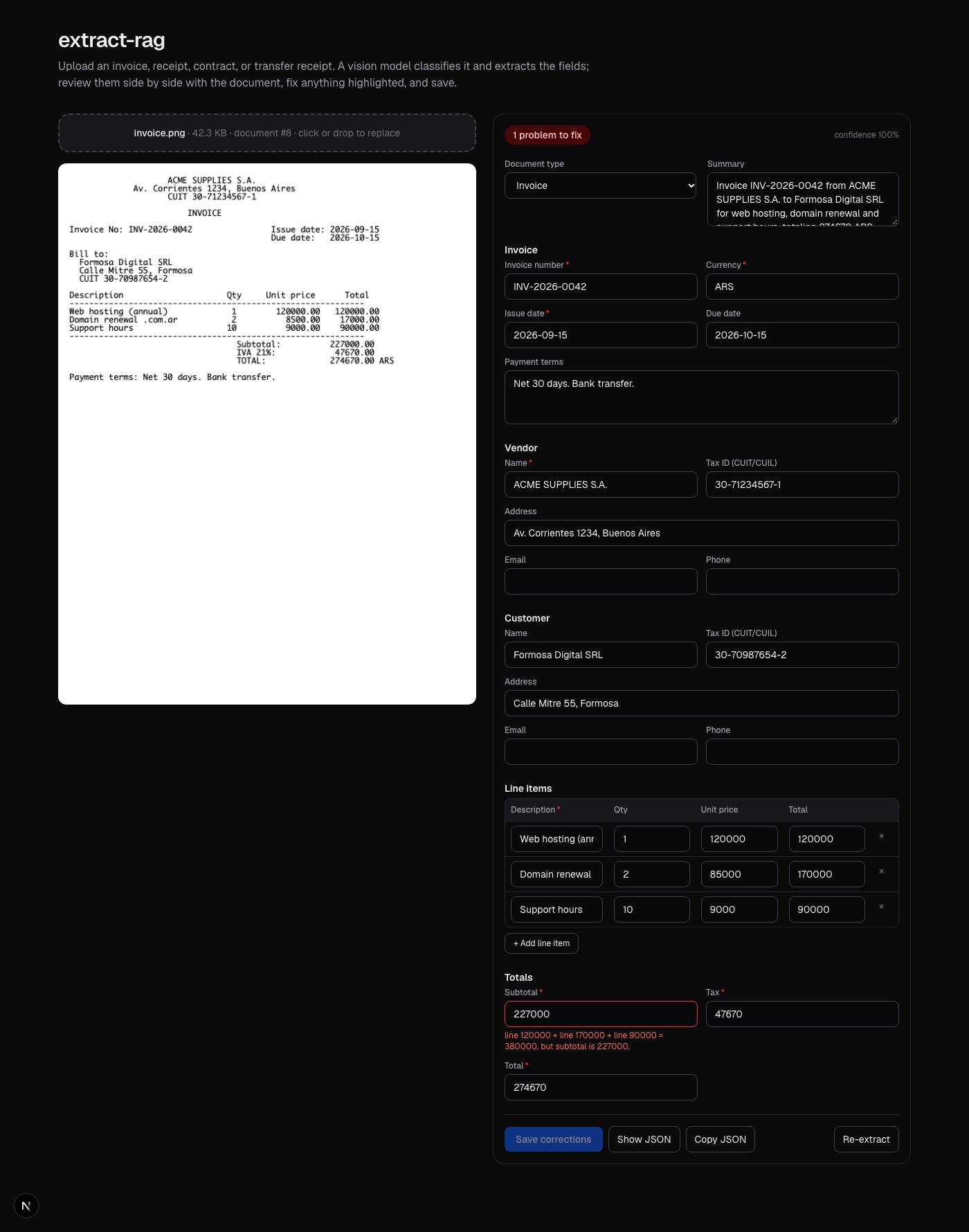
The review editor catching a model error: it read 85,000 where the invoice said 8,500, so the line items no longer add up to the subtotal.
This is the first entry of a build log. The "rag" in the name is still a promise; today is about the extraction part, which already works.
The stack, and why
Next.js 16 with the App Router, PostgreSQL with the pgvector extension running in Docker, and Zod for the schemas. The documents table stores the file, the detected type and the extracted JSON; document_chunks already has a vector(1536) column with an HNSW index waiting for part 2's embeddings.
The first thing I built was the boring part: a drag-and-drop area, a preview of the image or PDF, and an API route that saves the file and inserts the row. Without that there was nothing to extract.
First attempt with Claude, then the move to OpenRouter
The first version sent the file to the Claude API with structured outputs. It worked on the first try, but I wanted two more things: swapping models without touching code, and a per-document cost low enough that I wouldn't think twice before uploading a hundred receipts.
OpenRouter gives me both. It publishes a model list with each model's input modalities, so instead of guessing I filtered by image and settled on DeepSeek V4.1 Flash: it accepts images, supports response_format with strict JSON Schema, and costs $0.15 per million input tokens and $0.60 per million output tokens.
The catch: no DeepSeek model accepts PDFs natively. The fix is an OpenRouter plugin that OCRs the PDF and hands the text and page images to the model:
{
  "model": "deepseek/deepseek-v4.1-flash",
  "plugins": [{ "id": "file-parser", "pdf": { "engine": "mistral-ocr" } }],
  "messages": [
    { "role": "system", "content": "..." },
    {
      "role": "user",
      "content": [
        { "type": "file", "file": { "filename": "receipt.pdf", "file_data": "data:application/pdf;base64,..." } },
        { "type": "text", "text": "Classify this document and extract its data as JSON." }
      ]
    }
  ],
  "response_format": { "type": "json_schema", "json_schema": { "name": "document_extraction", "strict": true, "schema": {} } }
}
The JSON Schema is generated from the same Zod schema with z.toJSONSchema(), so there is a single source of truth for what the model returns and what the app validates.
What it costs, in numbers
Measured on my own receipts:
| Document | Time | Output tokens | Cost |
|---|---|---|---|
| WhatsApp photo (Mercado Pago) | 62 s | 3,504 | ~$0.003 |
| One-page PDF (Personal Pay) | 13 s | 561 | ~$0.004 |
A PDF costs a bit more than an image because OCR is billed separately, $2 per thousand pages. But it's much faster: the model gets clean text and doesn't have to reason over pixels. One dollar of credit covers about 300 photos.
Where the model gets it wrong
On a low-resolution test invoice I generated, the model read 85,000 where it said 8,500. The JSON was perfectly valid, every field filled in, confidence 100%. Nothing in the response hinted at a mistake.
That defined the next layer: a JSON with the right shape is not enough. The data has to make sense.
Real-world rules in Zod
Each document type has an extraction schema, with every field nullable so the model never has to invent anything, plus a superRefine with business rules on top:
- Real dates:
2026-02-30has the right format and doesn't exist. A due date can't come before the issue date. - The numbers have to add up: subtotal plus tax equals total, line items sum to the subtotal, quantity times unit price equals the line total. With a one-cent tolerance.
- Required fields per type: a transfer without an operation number or a recipient name is useless.
- Argentine check digits: CUIT/CUIL tax IDs use a mod-11 check digit and CBU/CVU bank accounts carry two control digits. This was my favorite part to implement, because it catches single-digit misreads that no other rule can see.
export function isValidCuit(s: string): boolean {
  const digits = s.replace(/\D/g, "");
  if (digits.length !== 11) return false;
  const weights = [5, 4, 3, 2, 7, 6, 5, 4, 3, 2];
  const sum = weights.reduce((acc, w, i) => acc + w * Number(digits[i]), 0);
  const mod = 11 - (sum % 11);
  const check = mod === 11 ? 0 : mod === 10 ? 9 : mod;
  return check === Number(digits[10]);
}
Every real tax ID and account number from my receipts passed. The ones I made up for the test invoice all failed, until I computed the proper check digit.
Reviewing next to the document
Validation runs in the browser on every keystroke. The document stays pinned on the left and the form sits on the right, generated from a per-type field configuration. Each invalid field turns red with the message underneath, and a counter at the top turns green once there's nothing left to fix. Corrections are saved with a PATCH and the server re-validates with the same rules.
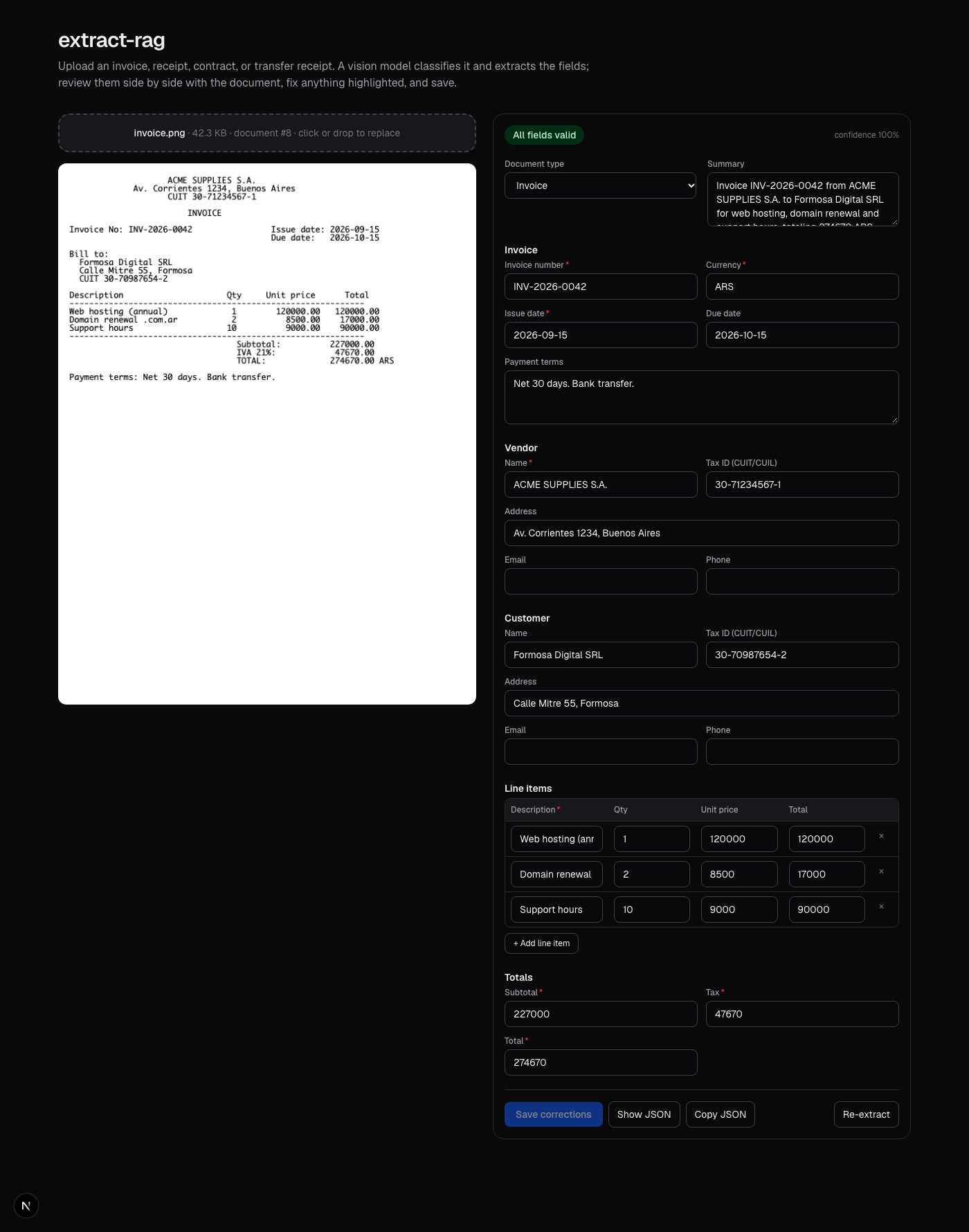
After fixing the unit price: everything adds up.
One thing that surprised me: the types I had defined at the start were invoice, receipt and contract. When I actually looked at my expenses folder, almost everything was a bank transfer slip, which is none of those three. They have a sender and a recipient with tax IDs and account numbers, an operation number, a reference code. I added a fourth type and tuned the prompt for Argentine formats: $ 10.000 means ten thousand, not ten, and 23/09/26 is 2026-09-23.
What's next
- Embeddings for each document in
document_chunksand semantic search: "how much did I transfer to Mario in September?" - Lowering the model's reasoning effort for images, which currently take about a minute.
Deploying itDone: it runs on Seenode with a managed Postgres that ships pgvector.
Update (October 15): the app is now live at extract-rag.seenode.app. To use it, paste your own OpenRouter key in the button on the top bar: it stays in your browser and each document is billed to your account, about 0.3 cents per photo.
Part 2 covers the chat with citations, generated SQL, the deployment and the redesign.