In my neighborhood, most kiosks and vegetable stores keep track of sales in a notebook: what was sold, who paid with a transfer, who took something "on credit" (fiado) and still owes it. MyKiosk is the point of sale I built to replace that notebook. It runs on a cheap Android tablet on the counter, several sellers share it, and the owner sees the numbers from anywhere.
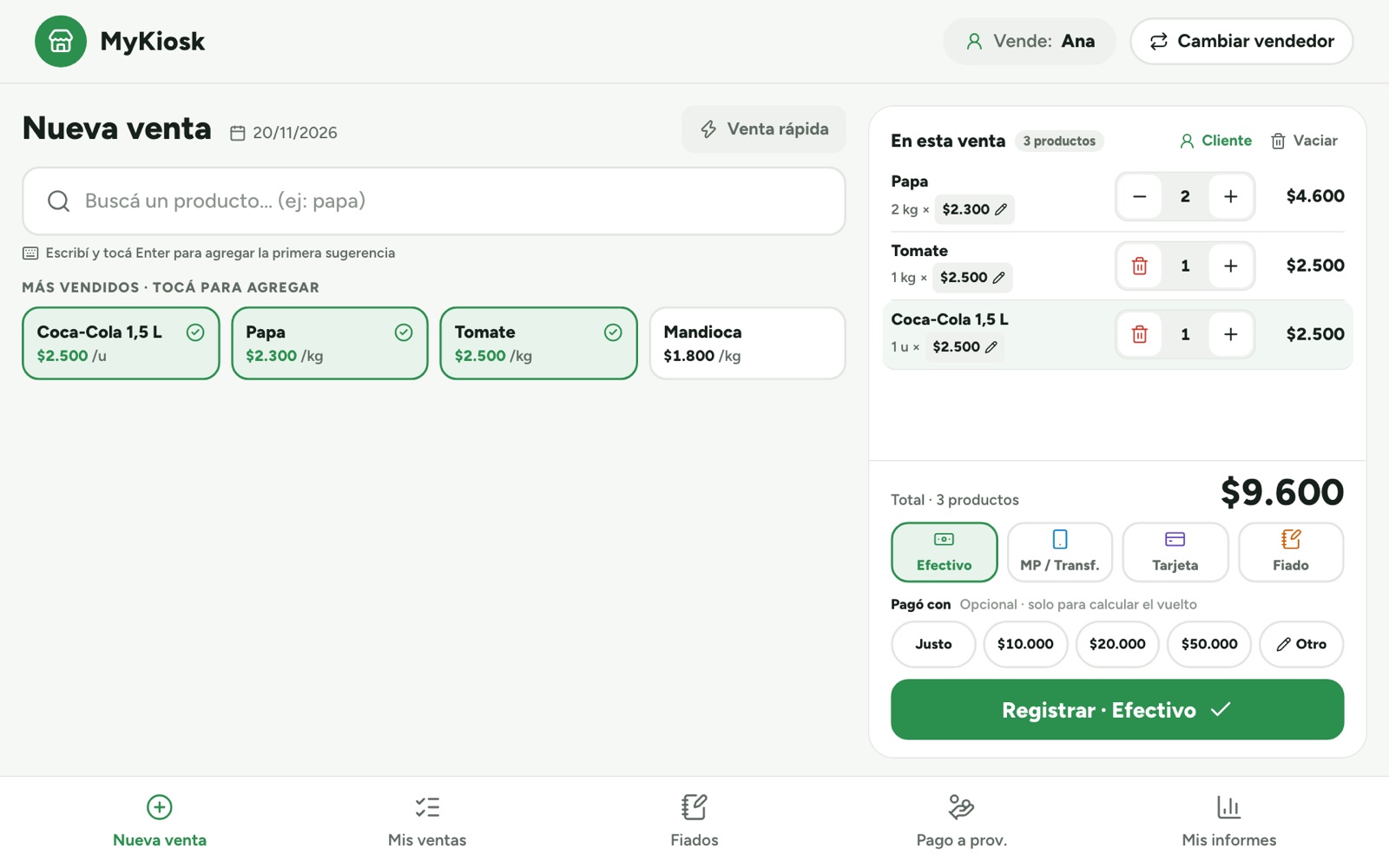
A sale of potatoes by weight, tomatoes and a Coca-Cola, ready to register as cash. Everything happens on one screen.
It is a SaaS: each shop is a separate business with its own sellers, products and customers, and pays a monthly subscription. It is in production, and the first round of feedback from a real client is already built in. This post covers how I built it and the decisions that shaped it.
Design first, in Pencil
Before writing code I designed every screen in Pencil, and the design file is the source of truth for the project. New screens are drawn and approved before they are implemented, at four sizes: tablet landscape and portrait, the real tablet's viewport, and a notebook.
The target device is a Samsung Galaxy Tab A9. In Chrome its viewport is 601×838 in portrait and only 1006×433 in landscape, so every screen had to fit with large touch targets (green #2B8F4E, Figtree, radii of 12/16/24). I tested on the physical tablet over USB, driving its Chrome from my Mac with Playwright.
One screen to sell
The first version of New Sale was a three-step wizard: what did you sell, check the prices, how did they pay. On the counter it was too slow. I replaced it with a single screen: tap a product tile to add it, the cart and the total are always visible, and choosing the payment method shows the register button.
Products sold by weight were the tricky part. The first version had ¼, ½ and 1 kg buttons inside the cart; the client asked to type the weight straight from the scale. Now a kg product opens a popup with a number pad, already on 1 kg:
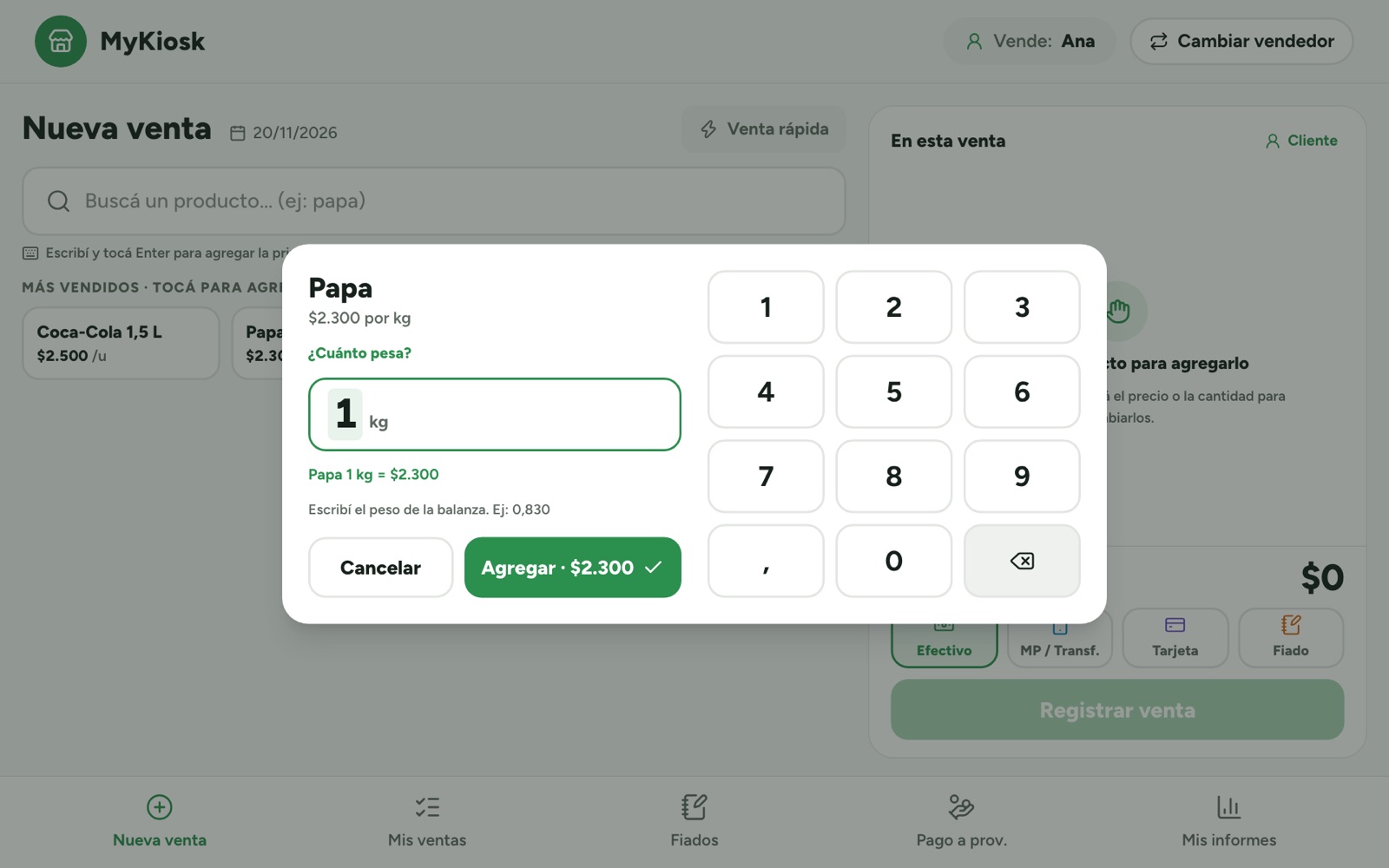
The popup shows the price of the line before adding it. Prices, quantities and "Pagó con" (amount tendered) all use this in-app pad instead of the Android keyboard.
A shared tablet: email + PIN
On a counter tablet, several sellers take turns. Each one signs in with their email and a 6-digit PIN, and the tablet can remember the email so the next time only the PIN is needed.
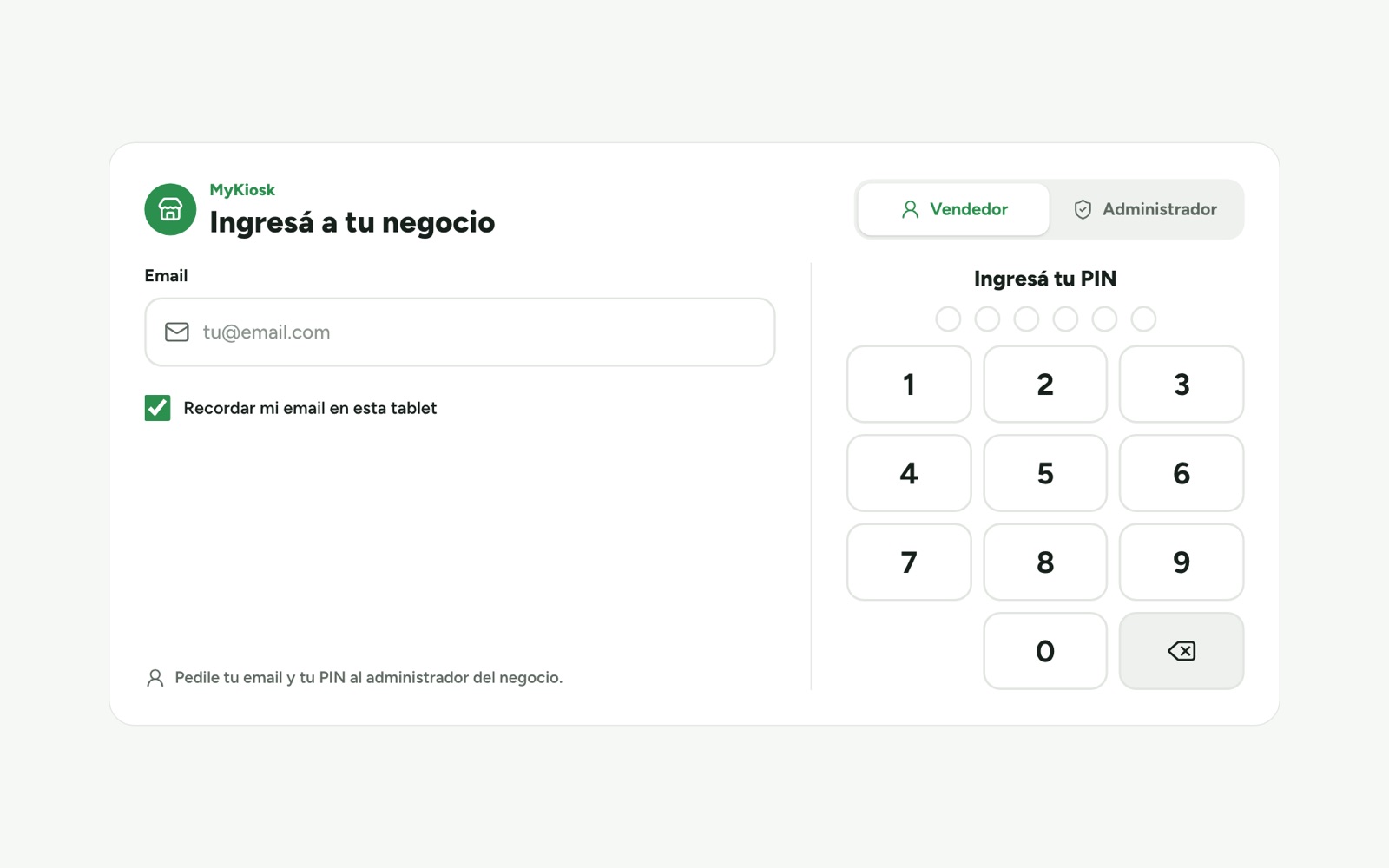
The PIN is checked on the server, never in the app. A small detail that took a while: the email field has autocomplete turned off, because Chrome's "save password" prompt covered the PIN pad on a shared tablet.
Security lives in Postgres
The backend is Supabase: Postgres, Auth and Edge Functions. The rule I set from the start is that the frontend only improves the experience; authentication, roles, the isolation between businesses, seller limits and subscription access are enforced in the database with Row Level Security policies and functions. The app never sends a business ID that the server trusts.
Registering a sale is a single Postgres function, register_sale. It is atomic, recomputes the totals on the server (it does not trust the client's), and is idempotent:
-- Idempotency: the same sale sent twice (offline retries, double taps) is stored once.
select * into v_existing from public.sales where id = v_id;
if found then
  if v_existing.business_id <> v_business or v_existing.seller_id <> v_uid then
    raise exception 'forbidden' using errcode = '42501';
  end if;
  return jsonb_build_object('id', v_id, 'duplicate', true);
end if;
The sale ID is a UUID generated on the tablet, which is what makes the next section possible.
PIN sign-in got the same care: an unknown email, an inactive seller and a wrong PIN all get the same answer with the same bcrypt cost, so the login cannot be used to find out which emails exist. After 5 failures the seller is locked until the admin sets a new PIN, and there is a per-client limit of 20 failures every 15 minutes.
Sales keep working without internet
Wi-Fi in a small shop drops out. Losing a sale because of that was not an option, so the app is offline-first: the server is the source of truth, and the tablet keeps the last snapshot it received plus an outbox of changes the server has not confirmed yet. What the screens show is always the snapshot with the outbox applied:
/** Applies pending changes on top of the server snapshot. Pure; ops already reflected in the snapshot are skipped. */
export function applyOutbox(base: KioskData, outbox: readonly OutboxOp[]): KioskData
A sale recorded offline shows up in "Ventas de hoy" right away, with a badge in the header ("Sin conexión · 2 por enviar"). The outbox is sent in order when the app starts, when the connection comes back, when the tablet returns to the foreground and every 60 seconds. Since register_sale is idempotent, sending the same sale twice is harmless. If the server rejects a change for good, it is kept and shown, never dropped silently.
The app is a PWA installed on the tablet in fullscreen mode. I checked on the real tablet that with Wi-Fi off the installed app opens with the seller's session and keeps recording sales.
Credit, tickets and WhatsApp
Fiado is how many neighborhood shops work: the customer takes the goods and pays later. A credit sale needs a named customer, creates a debt for the full amount, and the "Fiados" screen shows who owes what. Paying it off counts as cash collected on the day of the payment, not as a new sale, so the daily numbers don't count it twice.
Every sale has a ticket. The client wanted to send it on WhatsApp, so "Compartir ticket" draws a receipt image on a canvas (no extra library) and opens Android's share sheet:
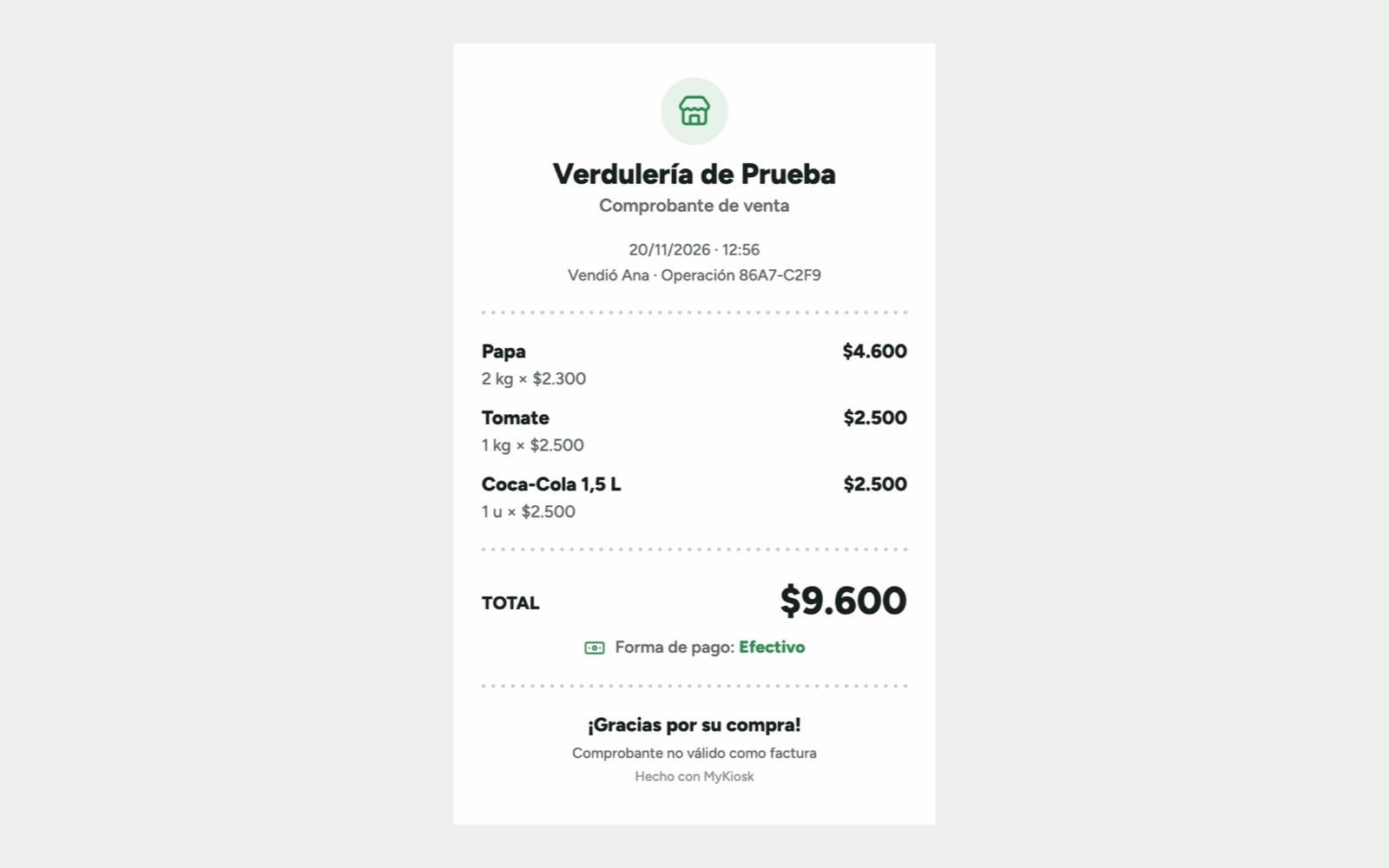
It says "Comprobante no válido como factura": it is a receipt, not a tax invoice. Electronic invoicing with ARCA is a separate project.
Numbers for the owner, and for me
The owner (the business admin) manages products and stock, customers, suppliers and supplier payments, and gets reports. The one they look at most is the cash summary: how much cash came in, how much went out to suppliers, and how much should be in the drawer.
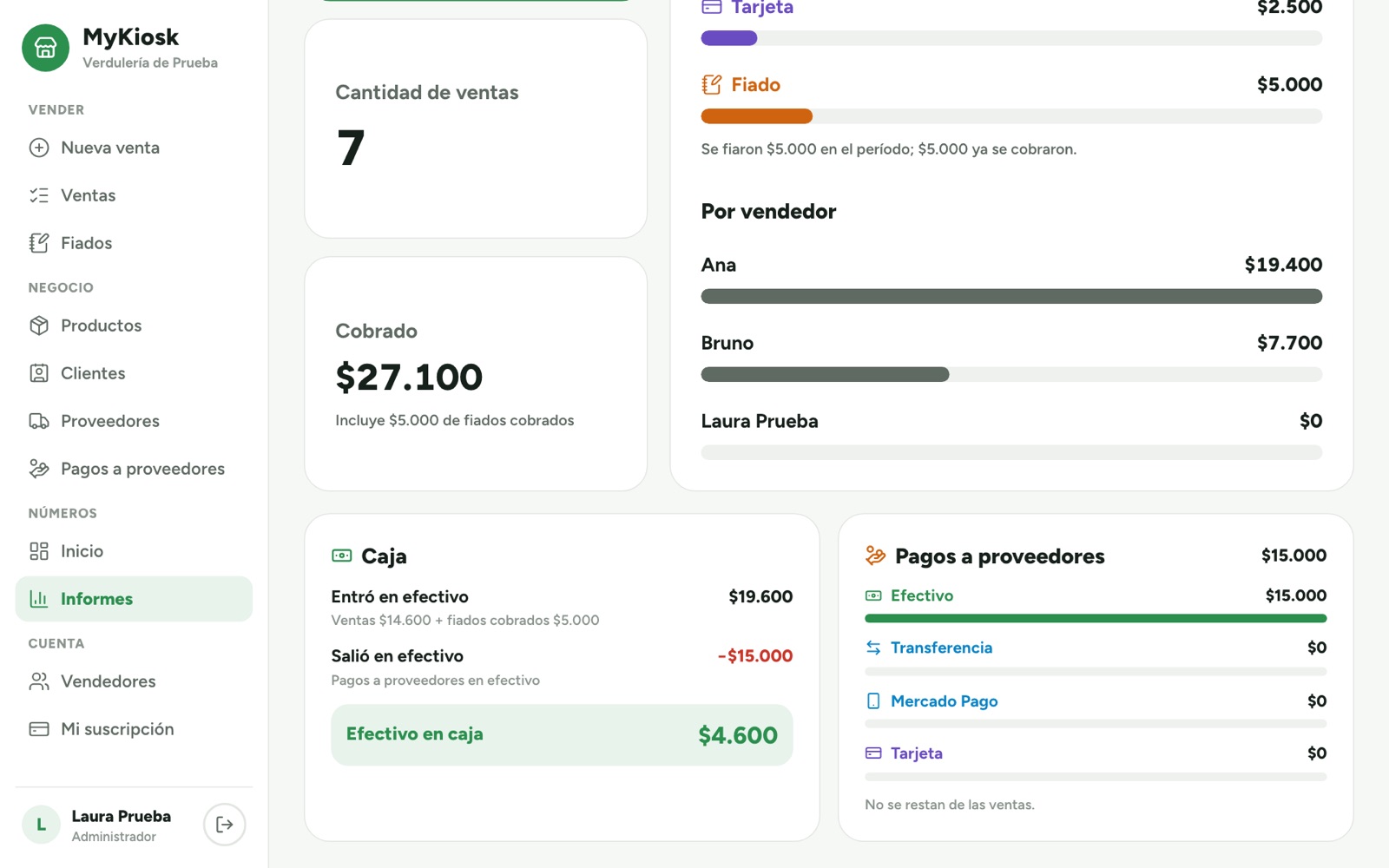
Supplier payments never reduce gross sales, and transfers never touch the cash drawer: two rules that the server computes, not the app.
Above all the shops there is my own panel as the platform's super admin: businesses, their subscription status and the payments I register by hand.
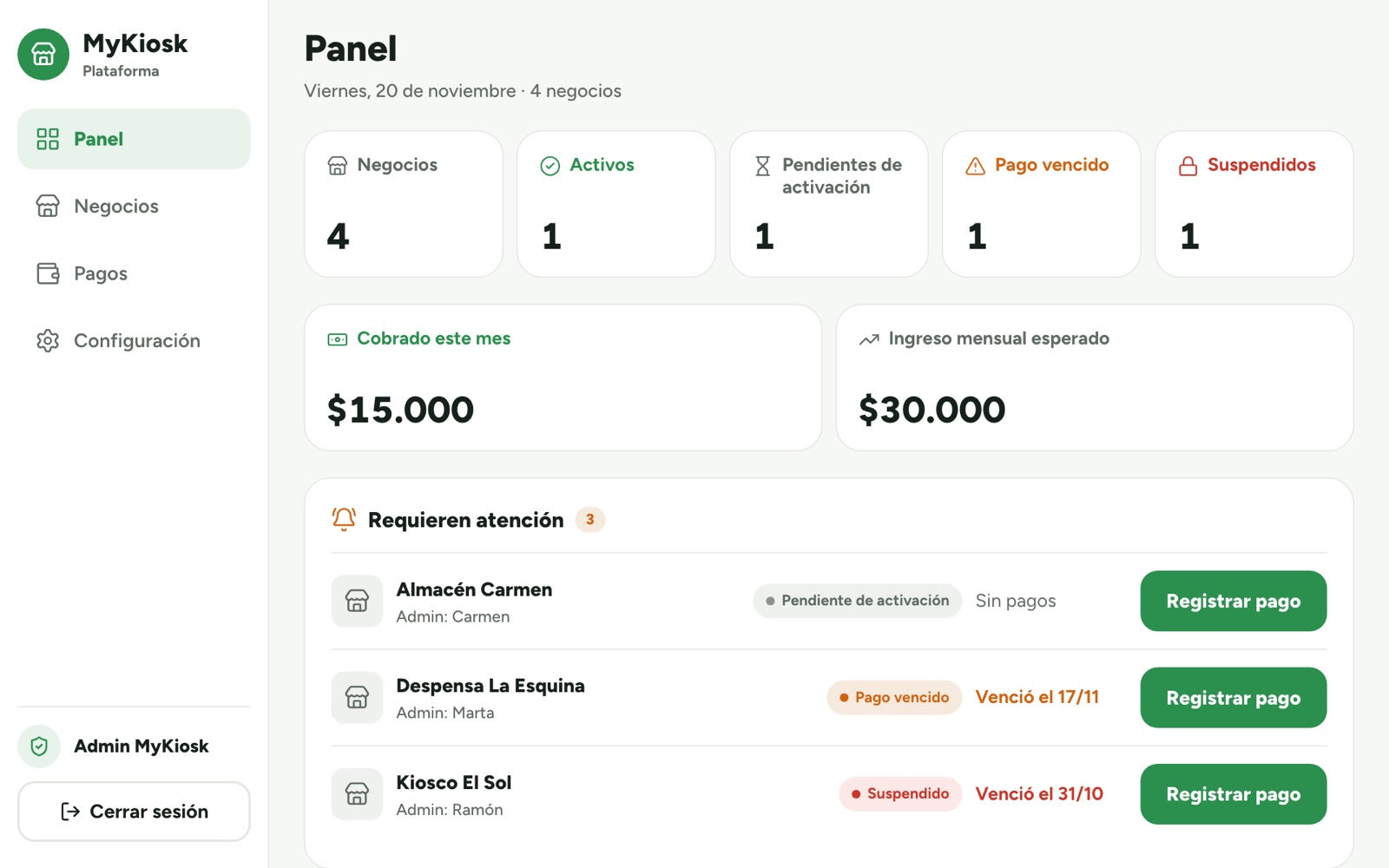
Subscriptions are confirmed manually: when a shop pays by transfer, I register the payment and the business is activated. A daily job in Postgres (pg_cron) marks a business as overdue when its period ends, and suspends it after 7 grace days; the admin sees a banner with the dates, and paying reactivates it. It never deletes data.
Tests, and documentation for agents
Most of the business rules are pure functions or database functions, which made them easy to test:
- 251 pgTAP tests on the database: policies, isolation between businesses, sales, debts, stock.
- 50 Vitest tests for the rules in the app, including the outbox against a fake server.
- 71 Playwright tests that run the flows at four tablet sizes.
I built the project with AI agents, and the repository is organized for them: a CLAUDE.md with the permanent rules, a docs/STATUS.md that every session updates, and a docs/DECISIONS.md with every product decision numbered (D-001 to D-019 so far). When the client asked for changes, the decision log records what changed and why, and the next session starts from there instead of from memory.
The repository is private. If you want to see the code or know more about how it works, use the "Request code access" button on the portfolio page and tell me what interests you.