I'm currently taking Patrones de Diseño Agéntico (Agentic Design Patterns), a course on DevTalles. It explores how to build AI-powered systems that do more than generate text: they can use tools, plan tasks, evaluate their own results, and interact with external systems to solve real-world problems.
As a Mobile Engineer, I want to understand these patterns and explore how to apply them to mobile applications. This post is a living log: every time I finish a pattern, I add a section with what I learned and how I see it working in a mobile app.
The code I write along the way is in alexistec/agentic-patterns, built with TypeScript, the AI SDK and Zod.
Tool Use
The Tool Use pattern lets an AI model interact with external tools, such as APIs, databases and other services, to retrieve information or perform actions.
Instead of relying only on its internal knowledge, the model decides which tool to use, provides the required parameters, and uses the returned result to generate its answer.
What I learned: an AI model doesn't need to know everything. It needs to know when to use a tool, how to use it, and how to interpret the result.
This matters most when the answer depends on real-time information or data that must be verified.
What I built
The exercise uses a small course catalog the model has never seen. The question is: "How much would the TypeScript and Docker courses cost together with a 20% discount? Also, tell me the total number of hours."
Without tools, the model has two options: make up prices with full confidence, or give up. With tools, it looks up the real data. I gave it two:
findCourses: searches the catalog by title or level.calculateTotal: adds up the prices of a list of courses and applies a discount.
A tool is a description (which the model reads to decide when to use it), an input schema (which validates the parameters the model sends) and a function that does the work:
const calculateTotal = tool({
  description:
    'Calculate the total price of a list of courses by applying a percentage discount. ' +
    'Always use this tool for any arithmetic operation. Do not calculate mentally.',
  inputSchema: z.object({
    ids: z.array(z.string()),
    discountPercent: z.number().min(0).max(100).default(0),
  }),
  execute: async ({ ids, discountPercent }) => {
    const courses = COURSE_CATALOG.filter((c) => ids.includes(c.id));
    const subtotal = courses.reduce((acc, c) => acc + c.priceUSD, 0);
    const discount = subtotal * (discountPercent / 100);
    return { subtotal, discount, total: subtotal - discount };
  },
});
Then the model gets the tools, an instruction not to invent data, and a step limit so the loop always ends:
const { text } = await generateText({
  model,
  prompt: QUESTION,
  tools: { findCourses, calculateTotal },
  stopWhen: stepCountIs(6),
  instructions:
    'Never make up course names, prices, or durations. ' +
    'Always check the available tools for this information before answering.',
});
Two details stood out to me. First, the description is a prompt: telling the model "do not calculate mentally" is what pushes it to call the tool instead of doing the math itself. Second, the model only picks the tool and its arguments; my code runs it. The model never touches the catalog directly.
A practical example in mobile
Imagine a banking app with an AI assistant. A user asks:
"How much did I spend on groceries last month?"
The assistant could follow these steps:
- Understand the request: identify the date range and the grocery category.
- Call a tool: request the user's transactions from the backend API.
- Process the data: filter grocery transactions and calculate the total.
- Return the answer: show the result in the app, based on the retrieved data.
The assistant might answer: "You spent $250 on groceries last month." That amount comes from the user's real transactions, not from the model's assumptions.
From a mobile engineering perspective, this fits well with what apps already have: a backend with well-defined APIs and use cases that already know how to fetch and compute data. Each tool can be a thin wrapper over a use case that already exists, so the AI layer reuses the same logic as the rest of the app instead of duplicating it.
My main takeaway: Tool Use connects the reasoning of AI models with the real capabilities of software systems. The value isn't only in generating answers, but in retrieving reliable data and taking the right actions.
Planning
The Planning pattern makes the model break a task into steps before it starts solving it. First it writes a plan, then it works through each step, and finally it combines the partial results into one answer.
Without a plan, the model tries to solve everything in a single pass. That works for simple questions, but when a task has several rules that depend on each other, some of them get lost along the way.
What I learned: a plan doesn't make the model smarter. It makes each step smaller, so every step only has to get one thing right, and it carries the result forward to the next one.
What I built
The exercise is a puzzle: 7 villains have escaped from a maximum-security prison, and the model has to design the operation to capture them all with 5 heroes. The task combines several rules:
- Each villain can only be stopped by one specialty (fire, light, technology or telekinesis).
- Each operation takes 2 hours, and each hero has a limited number of hours.
- Villains must be handled by threat level, from most to least urgent.
- One villain can free the others, so he has to be captured first. The scenario doesn't say this directly: the model has to work it out from the description of his power.
The operation is possible, but only just: there are three villains that only light can stop, and the hours only add up if two different heroes share them.
What happened without planning
First I ran it without a plan: a single call with the whole mission. The answer looked solid, with a table, observations and a conclusion, but it was wrong:
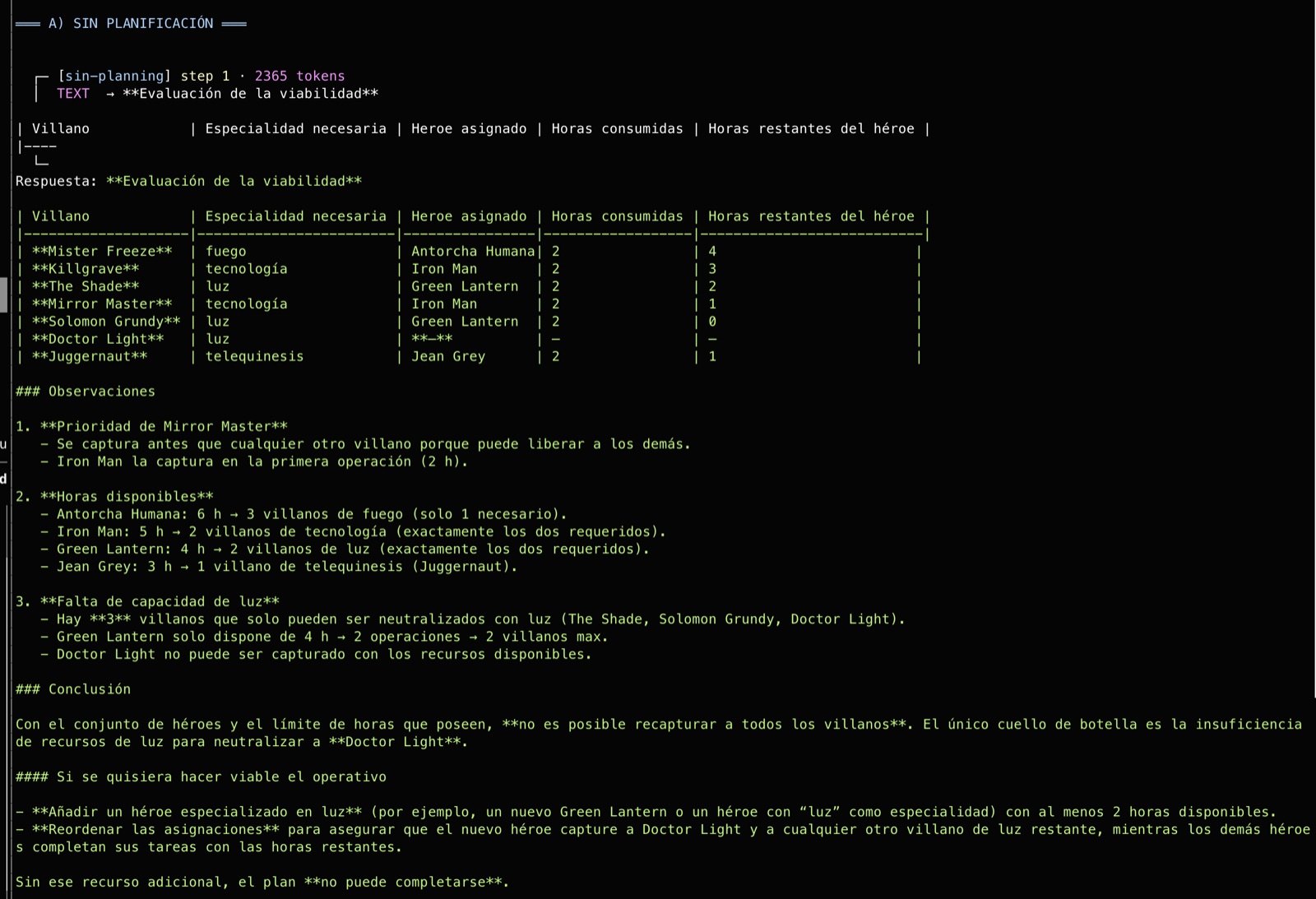
- It forgot a hero. When it counted the available hours, it only listed four heroes and left out Superman, who can use light. With him, the three light villains are covered.
- So it reached the wrong conclusion. It said the operation wasn't possible and suggested adding a new light hero, when the heroes it already had were enough.
- It contradicted itself. In the observations it says Mirror Master is captured first, but in its own table Iron Man goes after Killgrave first.
All of that came from a single call:

It's cheap: 1 step and 2,365 tokens. But the model tried to keep every rule in mind at once, and some of them got lost along the way.
The solution with planning
The solution has three phases. In the first, the model only writes the plan. I ask for it as an object validated with a Zod schema, so I get a list of steps I can loop over instead of free text:
const planSchema = z.object({
  steps: z
    .array(
      z.object({
        goal: z.string().describe('What does this step solve, in one sentence?'),
        reason: z.string().describe('Why is this step needed?'),
      }),
    )
    .min(2)
    .max(15),
});

const { output } = await generateText({
  model,
  output: Output.object({ schema: planSchema }),
  prompt: MISSION,
  instructions:
    'You are a strategist. Do NOT solve the operation yet. ' +
    'Only break it down into ordered steps, where each step depends on the previous one.',
});
In the second phase, each step is a separate call. The model receives the original mission, what has been solved so far, and only the step it has to solve now:
const findings: string[] = [];

for (const step of output.steps) {
  const { text } = await generateText({
    model,
    instructions: 'Solve only the given step. Do not jump ahead or give the final operation.',
    prompt:
      `Original mission: ${MISSION}\n\n` +
      (findings.length ? `Solved so far: ${findings.join('\n---\n')}\n\n` : '') +
      `Step: ${step.goal}`,
  });

  findings.push(`[${step.goal}]\n${text.trim()}`);
}
In the third phase, one last call combines all the partial results into the final operation.
Two details stood out to me. First, I had a bug in how I built the step prompt: without parentheses around the ternary operator, JavaScript joined the strings in the wrong order, and each step received neither the mission nor the step to solve. The code compiled without errors, so I only found it by checking the exact prompt the model was receiving. With patterns that chain several calls, it's worth logging what each call gets. Second, planning has a cost: more calls, more tokens and more waiting time. It's worth it when there are rules that can get lost. If the task is simple, it adds cost and nothing else.
A practical example in mobile
Imagine a barbershop booking app with an AI assistant. A user writes:
"Book a haircut and beard trim this Saturday before noon with my usual barber, and remind me the day before."
The request looks simple, but it mixes several rules: a day, a time limit, a specific barber, two services that have to fit together in the schedule, and a reminder. The assistant could plan it like this:
- Find the usual barber: look at the user's booking history.
- Check availability: get that barber's free slots on Saturday before noon.
- Check the duration: make sure both services fit in the same slot.
- Make the booking: reserve the slot.
- Schedule the reminder: create a notification for Friday.
Here Planning and Tool Use work together: the plan decides the order, and each step calls a tool (the booking history, the barber's calendar, the booking API, notifications).
From a mobile engineering perspective, a few things stand out to me:
- The plan can be shown in the UI. Since it's a list of steps, the app can show it as a checklist that updates as each step finishes, instead of a spinner that gives no information.
- The user can confirm before acting. For actions like booking or paying, the app can show the plan and wait for a confirmation before running it.
- Latency matters more on a phone. Each step is another call, so it's worth planning only when the request really needs it, and leaving simple questions to a single call.
- The model runs in the backend. The app sends the request and receives the progress; the API keys and the calls to the model stay on the server.
My main takeaway: Planning trades speed for reliability. It costs more calls and more tokens, and what you get in return is that every rule survives until the final answer.
Reflection
The Reflection pattern makes the model review its own work and fix it before delivering it. The model generates an answer, a reviewer checks it, and if something is wrong, the model corrects it. The loop repeats until the answer passes or it reaches an iteration limit.
What I learned: asking the model "is this right?" isn't enough. Reflection only works when there are concrete criteria to check (a rubric), and it's much more reliable when part of the review happens outside the model.
What I built
This time the exercise is mobile: the model receives a React Native screen with performance problems and has to optimize it. The original component renders a list of transactions with ScrollView and map, uses the index as the key, and filters the list on every render. The task has seven requirements: use FlatList, a keyExtractor with the transaction ID, memoize the filter with useMemo, avoid any, keep the search, don't mutate the original array, and render the description and amount.
I compared three strategies:
- A) Without reflection: the model generates the code once.
- B) Naive reflection: the model generates the code and then asks itself "is it ready to deliver?", without any criteria.
- C) Reflection with a rubric: a reviewer checks each requirement with evidence, the model fixes what fails, and the loop repeats up to 3 times.
In strategy C, the reviewer answers with a schema that only lists the requirements that aren't met. If the list is empty, everything passes:
const criticSchema = z.object({
  missing: z.array(
    z.object({
      requirementNumber: z.number().int().min(1).max(REQUIREMENTS.length),
      evidence: z.string().describe('Concrete evidence of why it is not met'),
    }),
  ),
  isComplete: z.boolean().describe('True only if every requirement is met'),
});
On top of the model's review, I added a programmatic judge: a function that checks the code with regular expressions, without asking the model anything. It's a heuristic (it doesn't compile the code or run tests), but it's independent. The loop only stops when the reviewer and the judge both approve:
const modelApproved = critique.isComplete && critique.missing.length === 0;
const auditApproved = score === checks.length;

if (modelApproved && auditApproved) break;
What happened
In my first run, the table showed something that looked like a clear win for reflection: without reflection the code passed 7 of 8 checks, and with reflection it passed 8 of 8.
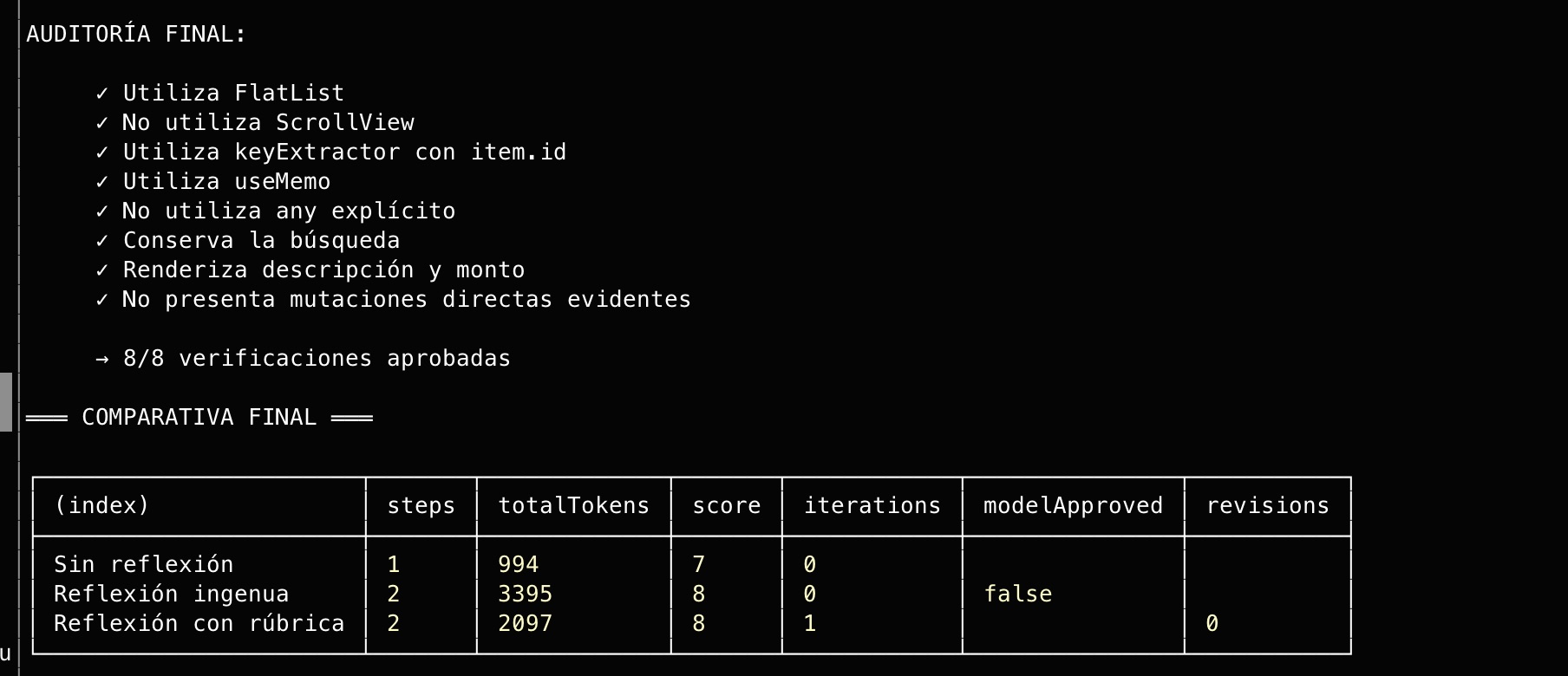
But the comparison wasn't fair. Each strategy generated its own first draft, so the difference could come from luck, not from reflection: the naive strategy reached 8 of 8 without changing a single line, because its draft was already better. There was another detail: the naive reviewer said the code was not ready (modelApproved: false), even though it passed every check. Without criteria, its opinion doesn't tell you much.
The judge also had a bug: it only accepted keyExtractor={(item) => item.id}, so it rejected correct versions like (item: Transaction) => item.id, which is exactly what a model following strict TypeScript writes. It also counted the word "any" inside a comment as an explicit any. If the judge is wrong, the loop keeps "fixing" code that was already fine, and the conclusions are wrong too.
After fixing the judge and making all three strategies start from the same draft, I ran it again:
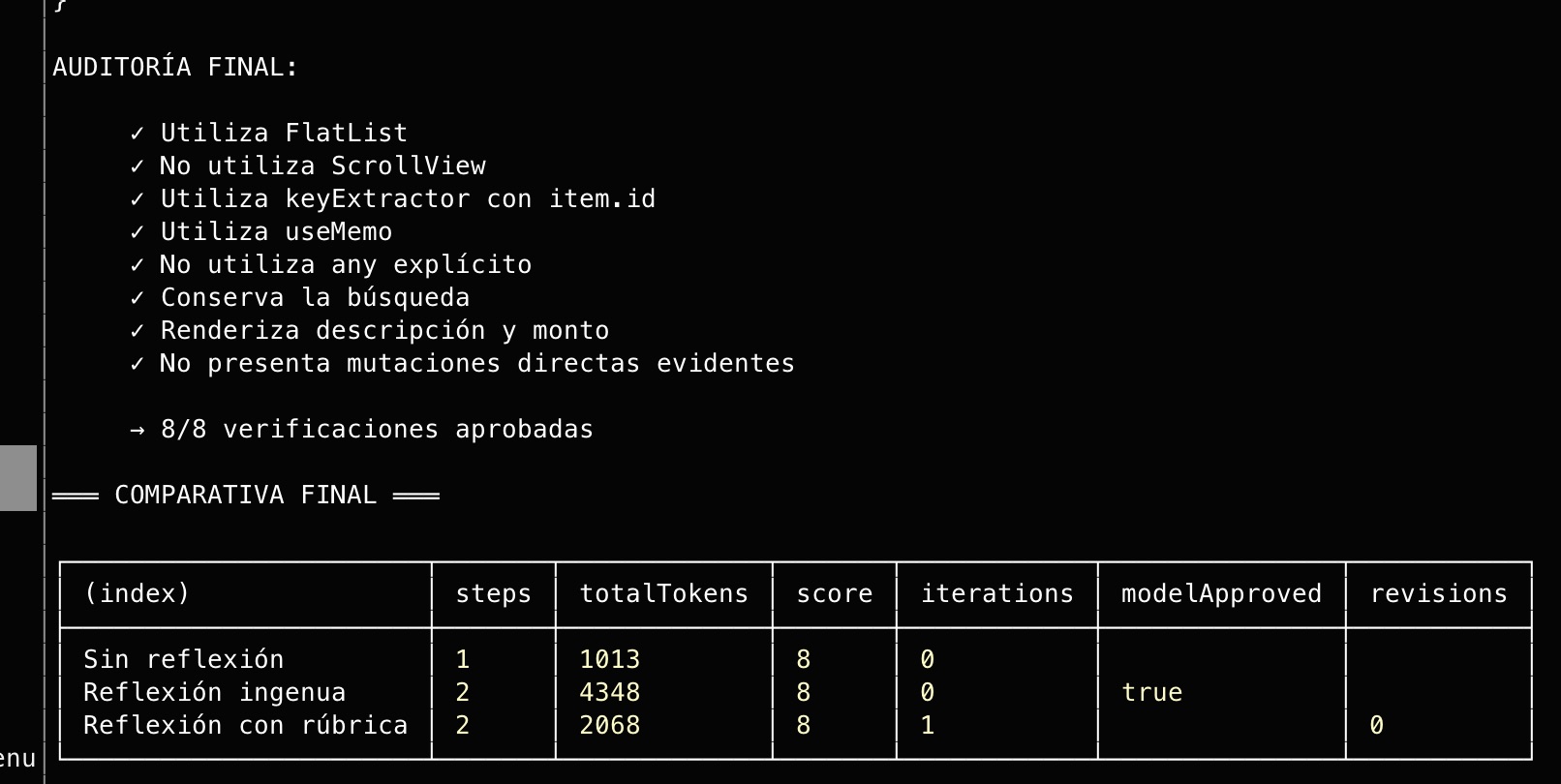
This time the draft was already correct, and the numbers tell a different story:
- All three got 8 of 8. Reflection didn't improve the code, because there was nothing to improve.
- The naive review was the most expensive: 3,335 tokens just to say "it's ready", more than three times the cost of the draft (1,013).
- The rubric review was cheaper: 1,055 tokens. It approved in the first iteration and didn't need any corrections. A short, structured list costs less than an open-ended opinion.
A practical example in mobile
Going back to the barbershop app from the Planning example: the last step of the plan was scheduling a reminder for the day before. Imagine the assistant writes the text of that push notification. Before sending it, it reviews it with a rubric:
- It fits on the lock screen: the text stays under a character limit.
- It has no sensitive data: no phone numbers, emails or payment details.
- It includes the key information: service, day and time.
- It uses the user's language and the app's tone.
The first three can be checked with code: length, regular expressions and checking that the date is in the text. Only the tone needs the model. If after a few attempts the text still doesn't pass, the app sends a fixed template, like "Reminder: your appointment is tomorrow at 10:00". The user always gets a correct notification, even when the model fails.
From a mobile engineering perspective, this is the same thing we already do with forms: validate the input before sending it. The difference is that here the input is written by a model, so the validation happens before the user sees it.
My main takeaway: reflection isn't free, and it isn't automatic quality. It's worth it when you know exactly what to review and can check it outside the model. And the reviewer needs reviewing too: a judge with a bug is worse than no judge at all.
ReAct
ReAct stands for Reasoning + Acting. The model works in a loop: it thinks about what it needs, calls a tool, observes the result, and decides the next action based on what it just saw. It repeats this until it has the answer.
It looks like Tool Use, but the focus is different. In Tool Use, the model calls tools to get data. In ReAct, each result decides what the next step will be.
What I learned: ReAct is the answer when a task can't be planned in advance. In Planning, the steps are known from the start. In ReAct, you only know the next step after seeing the result of the previous one.
What I built
I adapted the course exercises to something I deal with as a mobile engineer: investigating a crash. Users report that a React Native app closes when they open the cart, and the agent has to find in which version the crash appeared and which change caused it.
The agent has a single tool, getRelease, which returns the record of a published version: how many crashes it had in the cart, its list of changes and the version released just before it:
const getRelease = tool({
  description:
    'Returns the record of a published version of the app: date, number of ' +
    'crashes when opening the cart, list of changes and the previous version.',
  inputSchema: z.object({
    version: z.string().describe('Version number. e.g. "3.6.0"'),
  }),
  execute: async ({ version }) => {
    const release = RELEASES.find((r) => r.version === version);
    if (!release) return { error: `Version ${version} does not exist` };
    return release;
  },
});
The agent has to go back one version at a time until it finds one without the crash. The version right after it is the one that introduced the crash. That's why it can't be planned: nobody knows how many versions there are to check until they check them, because the previous version only appears inside each record.
I added a trap: the current version (3.6.0) includes a change called "Redesign of the cart header". It looks like the obvious culprit, but the crash already existed before.
The key part of the instructions is the closing condition, which tells the agent when it's done:
instructions:
  'Work in cycles: check the record of a version, look at how many crashes it has ' +
  'in the cart and decide if you need to check the previous version. ' +
  'CLOSING CONDITION: you are only done when you find a version with 0 crashes ' +
  'in the cart. The culprit is the version you checked right before it. ' +
  'Do not invent versions: take them from the previousVersion field.',
What happened
Without ReAct, the model only received the record of the current version. It said it couldn't be sure, but then it still pointed to version 3.6.0 and the cart header redesign as the likely cause: it fell into the trap. With ReAct, it went down version by version until it found the right one:
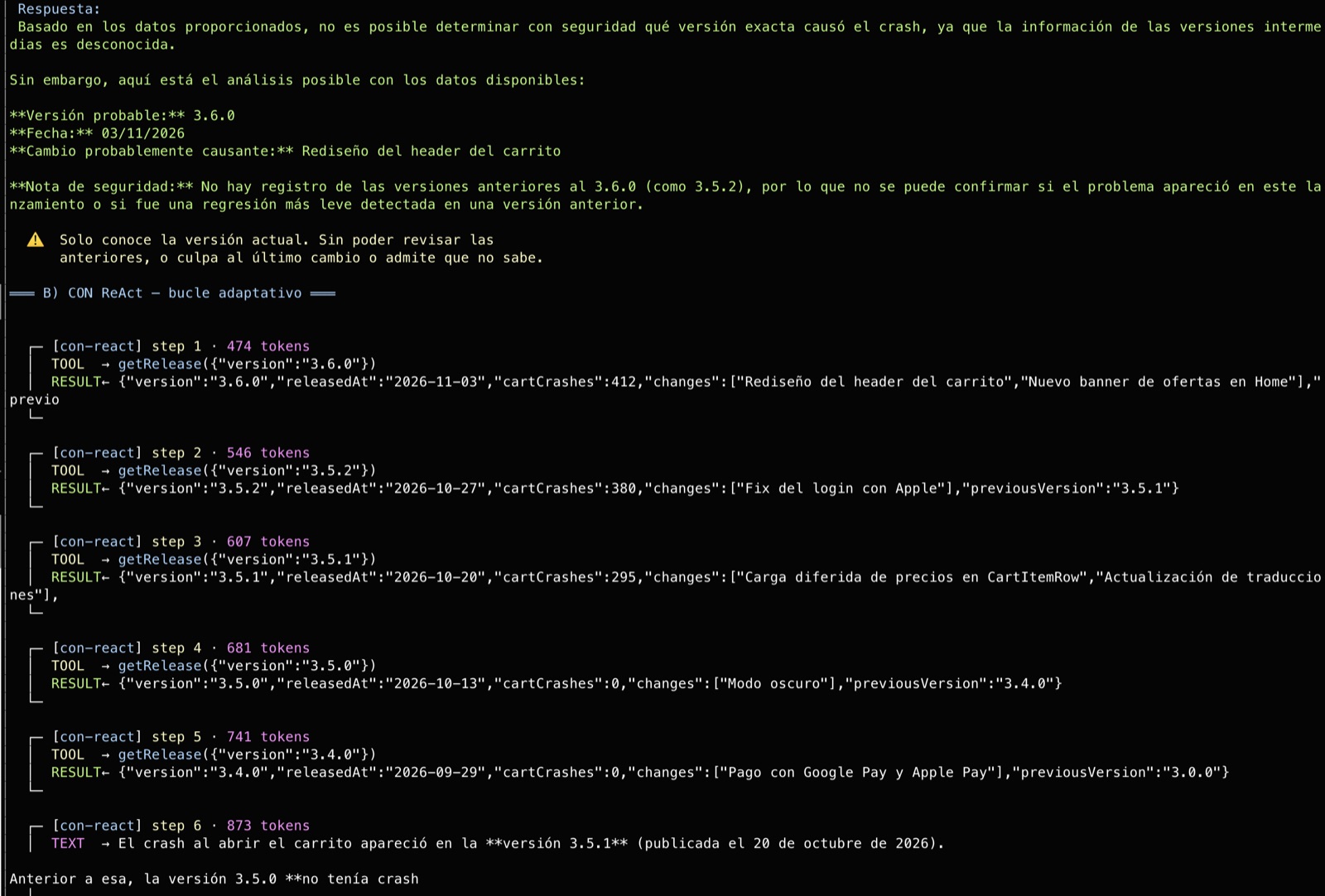
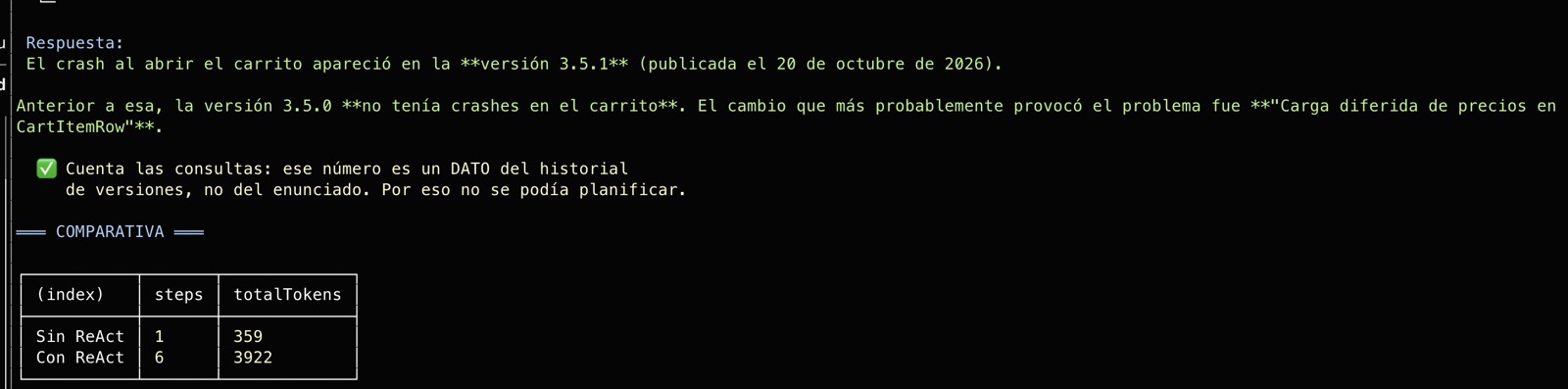
- The answer was correct: version 3.5.1, caused by "Deferred price loading in CartItemRow".
- It made one query too many. At version 3.5.0 it already had 0 crashes, which was the closing condition, but it still checked 3.4.0. It didn't change the answer, but it shows the risk of ReAct: since the model decides when to stop, a clear closing condition and a step limit (
stopWhen) are essential. - The cost grows with each step: 474 tokens in the first step and 873 in the last, because each call carries everything observed so far. In total, 3,922 tokens versus 359 without ReAct: about 11 times more.
In a second exercise, the first result is valid but wrong: searching for the cart's crashes returns the most recent one, which is from iOS, when the question was about Android. The tool warns that there are crashes on several platforms, and the agent has to notice and use a different tool to filter by platform, instead of repeating the same call.
A practical example in mobile
Imagine a support assistant inside a delivery app. A user writes:
"My order hasn't arrived."
The assistant doesn't know how many steps it will need. It checks the order, and the order points to a shipment. The shipment says it's with a courier. The courier has a location from 20 minutes ago and a delivery attempt marked as failed. Each answer decides the next query, and the chain can be two steps or six.
From a mobile engineering perspective, a few things stand out to me:
- Showing progress helps. Each step can be shown as a short status ("Checking your order…", "Looking for the courier…") instead of a long wait with no information.
- The step limit is a product decision. If the agent can't find the answer in N steps, the app should hand the conversation to a person instead of looping.
- Tools should be read-only by default. If the loop can also cancel orders or issue refunds, those actions need a confirmation from the user.
My main takeaway: ReAct trades predictability for the ability to adapt. It's the right pattern when the next step depends on what the previous one returned, and it always needs two things: a clear condition to stop and a limit for when it doesn't.